Own product · Live
dodo — file tools that never let your files fly off.
A free, privacy-first toolkit for images, PDFs and Office files that runs entirely in the browser. I designed it, built it and shipped it on my own, then gave it a small game so people had a reason to stay a minute longer.
The problem
"Free" file tools usually cost you your files.
Most free converters and compressors work by uploading your document to their server. For a passport scan, a contract or a client's photos, that's a trust decision people make without noticing. I wanted the everyday version of these tools with that step removed entirely, not just promised away.
dodo can't upload your files, because it doesn't have a server to upload them to.
A real part of the interface: after every task, dodo shows how many network requests happened while it worked, as counted by the browser itself.
Product principles
Small tools with good manners.
Six rules the product is built around. Each one shows up somewhere concrete in the interface, not just in the marketing copy.
Nothing leaves your device
Every tool runs in the browser tab. There's no upload step because there's nowhere to upload to.
Works offline
After the first visit it keeps working with Wi-Fi off, which is also the easiest way to check the promise.
No accounts, no limits
No sign-up wall, no "3 files a day", and no logo stamped on the output.
Batch everything
Drop fifty photos at once, save them one by one or grab everything as a single .zip.
Drops hidden metadata
Converted images are redrawn from pixels, so camera details and GPS location don't travel with them.
Free, without a catch
No "pro" tier hiding the useful buttons. It's static files, so there's no server bill to pass on.
What's inside
Four toolsets, one drop zone.
Image converter
JPEG, PNG and WebP, with resize, quality and an optional text watermark. Presets for website, email, social and thumbnails.
Document compressor
PDF, DOCX, XLSX, PPTX and images. Pick a level, or name a target size like 1 MB and let dodo find the best quality that fits.
PDF tools
Merge, split, reorder, rotate and remove pages, or turn a stack of photos into one PDF.
Encoder & decoder
Image to Base64 and back, copied as a data URI, CSS background, HTML tag or Markdown.
Design decisions
Where the UX work actually went.
The tools themselves are well-understood problems. The design work was in removing every decision a person shouldn't have to make.
Drop anything, get a suggestion
The homepage leads with one drop zone for any file. dodo looks at what you dropped and suggests the right tool, so nobody has to know the difference between "compress" and "convert" first.
Goals, not settings
People think in upload limits, not quality percentages. "Hit a size: 100 KB, 1 MB, 5 MB" sits right next to the usual levels, and the quality slider explains itself: 75–85% looks the same as the original to most eyes.
Never leave someone worse off
If compressing a file would make it bigger, dodo keeps the original. A tool that can silently make things worse loses trust fast.
Claims you can check
The FAQ doesn't just say "we don't upload". It tells you how to verify it: open the Network tab while converting, or turn off Wi-Fi and keep working.
Honest copy, everywhere
The "sound familiar?" examples on the homepage are labelled as common situations, not customer quotes. Analytics are anonymous counts only, respect Do Not Track, and switch off in one click.
Situations, not features
Each scenario ("the upload form says files must be under 2 MB") opens the right tool with the right preset already filled in.
Proof after every task
When a job finishes, dodo reports how many network requests happened while it worked, measured by the browser. Normally that's zero. If one ever does happen, it names the host instead of hiding it.
Play while you wait
Big batches take a while, so a floating dodo button fills a gold ring with progress and offers the game. The game opens over the page, conversions keep running at full speed, and a card drops in when the files are ready.
Why "dodo"
A flightless bird, for files that never fly off.
The dodo trusted every stranger who landed on its island, and it paid for it. Most file sites ask you to do the same with your documents. dodo takes the opposite approach, and the name carries that idea without a line of explanation. The story page goes further, with the real history of the bird, sourced and dated.
Read the dodo's story ↗Dodo Island · a little game
Your files are safe. Now keep the eggs safe too.
A small, calm browser game across three real islands: Mauritius in 1598, Île d'Ambre in 1662 where the last dodos were seen, and Rodrigues in the 1730s. Get the eggs home past the rats, sailors and cats that came off the ships.
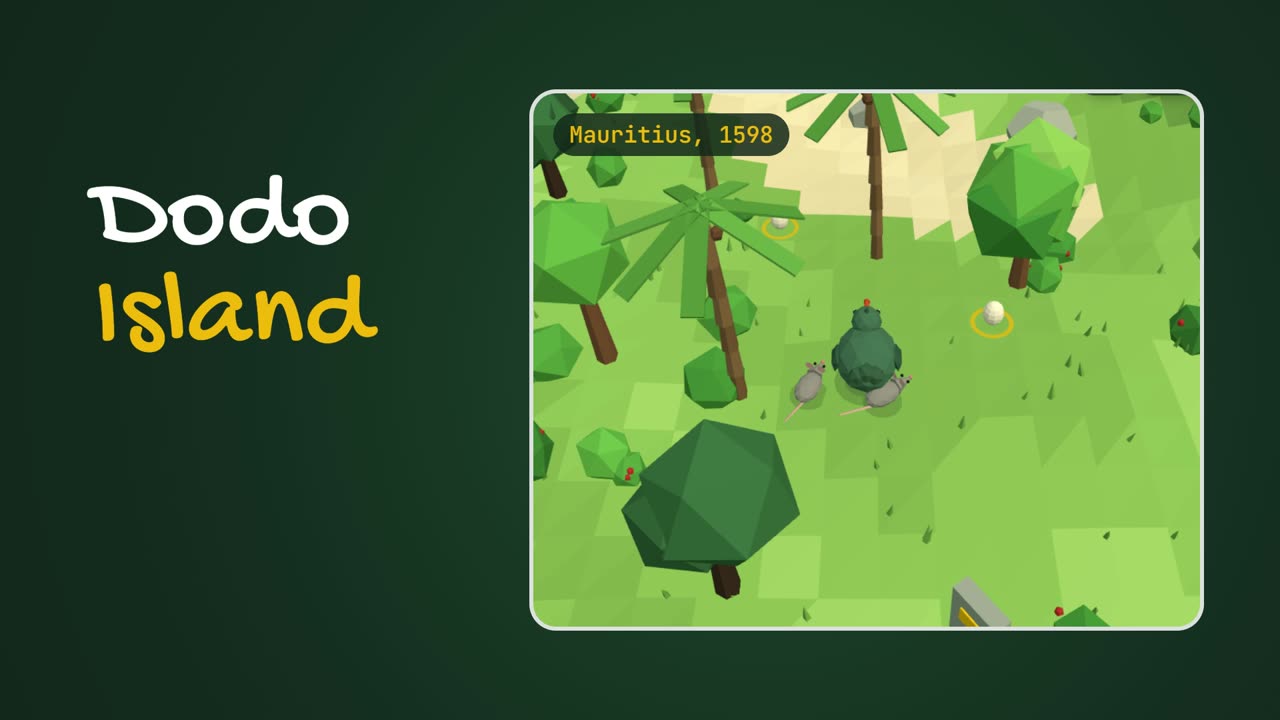
The game runs on dodo itself, so progress you save there stays with you.
Why a game in a file tool?
A batch of fifty photos or a heavy PDF takes time. Instead of a spinner, dodo offers something to do: a floating button fills with progress and invites you to play while the files finish. Signing in is optional and only saves your islands. The file tools never ask.
Progress follows you into the game
The game opens over the tools page, so nothing is interrupted. Progress shows inside it ("Compressing 4 of 12") and a card drops in when the files are ready. Only counts and percentages cross over, never file names or contents.
Under the hood
Boring technology, on purpose.
Images are decoded and re-encoded with the browser's own canvas. PDFs go through pdf-lib. Word, Excel and PowerPoint files are zip archives, so JSZip opens them and re-compresses the pictures inside. A strict content security policy stops the page sending data anywhere else, and it installs to a phone's home screen to work offline.
What I took away
Designing the whole thing changes the questions.
The constraint became the brand
"No server" started as a technical choice. It ended up as the name, the story, the copy and the reason people trust it.
Defaults do most of the UX
Most people never touch a setting. Getting presets and defaults right mattered more than any single screen.
Trust needs proof
Telling people how to check a claim themselves did more than any badge or privacy seal could.
Try it yourself
Shrink a PDF. Then go find the bottle.
dodo is free, needs no sign-up, and works on your phone. The rest of my work is a click away.